There is a kind of automation that has been quietly working for years: "when A happens, do B". A form comes in, it goes into a spreadsheet. An order arrives, an alert goes out. It is dull and it is reliable, because it decides nothing.
An AI agent adds exactly what those rules lacked: reading free text and deciding what to do with it. And with that ability comes risk, because a language model can be wrong with complete confidence. This article is about three workflows where that ability pays off, how to build them so a mistake does not cost money or customers, and when you are better off leaving things alone.
A warning before we start: I am not going to give you savings figures. They depend on how many forms, emails and invoices you handle and how long each takes you today, and I have not found reliable data that holds for an average small business. The useful thing is to measure first: count how many there are a month and how much time each one takes. If it is five, do not automate.
What an agent in n8n is (and is not)
In n8n, the AI Agent node works like this, according to its documentation: you connect a chat model and at least one tool, and the agent decides which tools to use to complete the task. A tool might be "look something up in the CRM", "create an email draft" or "query a document".
The difference from an ordinary workflow is exactly that: in an ordinary workflow you decide the path in advance; with an agent, the model decides. More flexible, and less predictable. So it pays to give it few tools, with minimal permissions, and to put a person in front of any action that cannot be undone.
That last part is already built into n8n since version 2.6 (January 2026): human review lets you require approval before the agent runs a specific tool. The workflow pauses, the reviewer sees which tool it wants to use and with what data, and approves or denies. It works through Slack, Telegram, Gmail, Microsoft Teams and other channels. Slack requires your instance to be reachable over public HTTPS, a detail that catches out people who host n8n at home.
Another novelty you will see mentioned: the AI Workflow Builder, which creates and fixes workflows from a plain-language description. It is an aid for building, not for operating: it gives you a draft workflow that you still have to review and test. Each request uses one credit from your plan, and according to the documentation your prompts, node definitions and the current workflow are sent to the model, but not your credentials or past executions. The documentation does not say which plans include it; check n8n's pricing page.
(What n8n 2.0 brought, incidentally, was not AI: its own release notes call it "a hardening release, not a feature release", with isolation for the Code node and other security changes.)
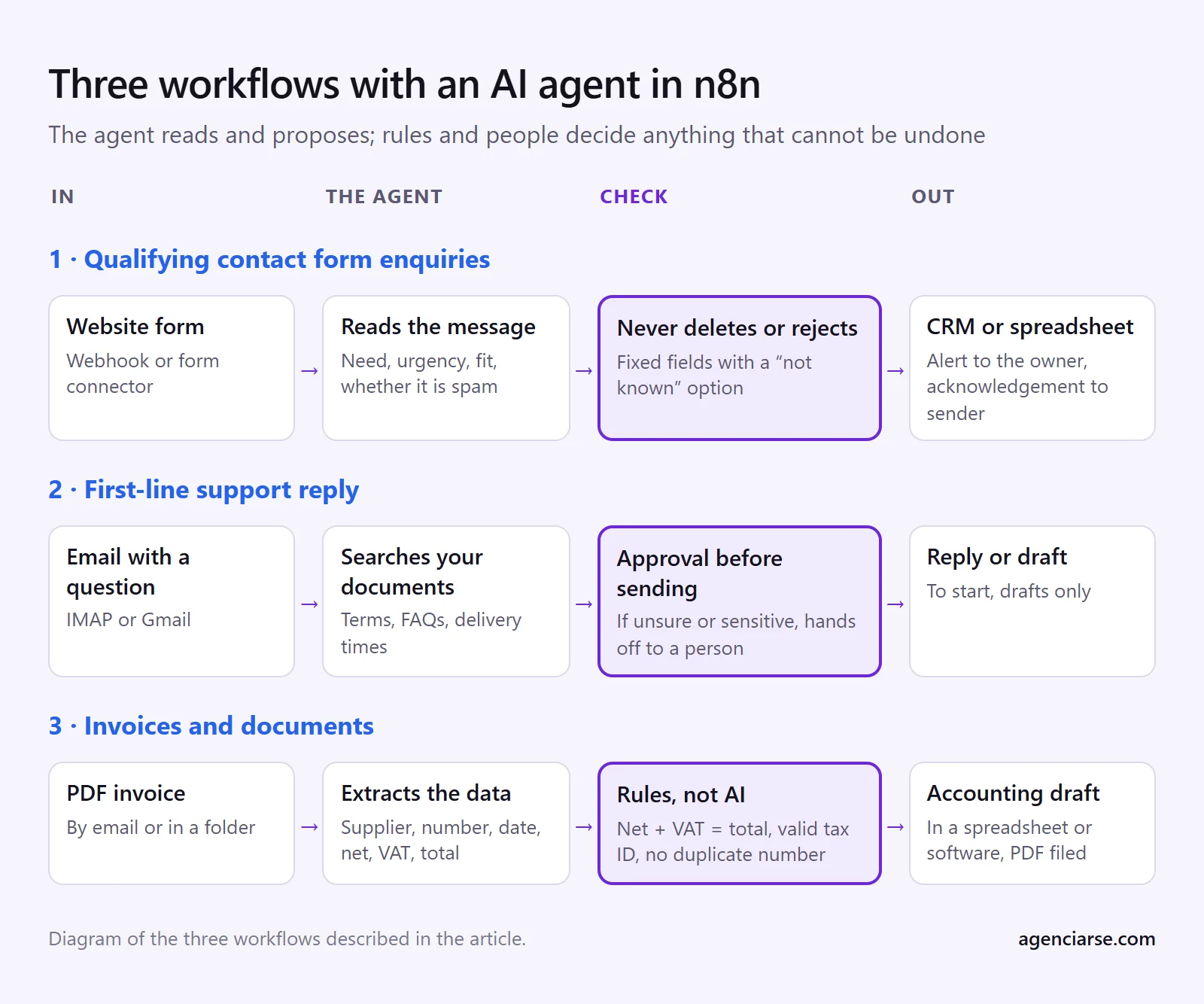
Workflow 1: qualifying enquiries from the contact form
What it does. Someone fills in the form on your website. The workflow picks up the message, an agent reads it and pulls out what matters (what they need, how urgent it is, whether it fits what you offer, whether it is spam) and logs it in your CRM or a spreadsheet, with a notification to whoever is responsible. The sender gets an acknowledgement.
Tools. An n8n webhook (or your form's connector), the AI Agent node, your CRM or a spreadsheet, and an email or message alert.
What can go wrong.
- The model invents what is not there. If the form does not state a budget, it should write "not stated", not a figure. The fix is to ask for fixed fields and give it an explicit "not known" option.
- It discards a good customer because the message was badly written. The rule is that the AI classifies and prioritises, but never deletes or rejects: every enquiry goes into the CRM, even if tagged "doubtful".
- Personal data going to a third party. A form carries a name, email and phone number, and all of it travels to the model provider. See the GDPR section below.
When not to. If you get ten enquiries a month, read them yourself. And if each enquiry is worth a lot and almost all of them fit, filtering saves you nothing.
Workflow 2: first-line support reply, with handoff to a person
What it does. An email (or message) comes in with a question. The agent looks for the answer in your own documents (terms, FAQs, delivery times) and drafts a reply. If it cannot find the answer, or the subject is sensitive, it does not reply: it alerts a person with the message and what it has found.
Tools. An email trigger (IMAP or Gmail), the AI Agent node with a tool that queries your documents, and an alert or approval channel. n8n's human review is made for this: the "send reply" tool sits behind an approval.
What can go wrong.
- It confidently answers something untrue (a delivery time, a returns policy). You reduce this by restricting it to answer only from what is in your documents, and by forcing it to say "I don't know" and pass the case on.
- Complaints, anger, legal questions, health or money: these are not for an automated first filter. You have to detect them and bypass the AI.
- Transparency. If a customer is talking to an AI, they should know. The EU AI Act (Article 50) requires people to be told they are interacting with an AI system, applying from 2 August 2026 according to the sources I consulted; check with your adviser how it affects you.
- Channel. If the channel is WhatsApp, check the platform's terms of use for bots before building anything.
When not to. If every enquiry is different and calls for judgement (bespoke services, delicate cases), the agent just gets in the way. Also when nobody will check the "doubts" inbox: a handoff to a person who does not look is worse than having no agent.
A good low-risk start: have the agent leave a draft in your mailbox instead of sending. You read it, adjust it and send it. Once you see it gets a certain type of enquiry right almost every time, you decide whether to automate those.
Workflow 3: invoices and documents
What it does. A supplier invoice arrives by email as a PDF. The workflow extracts the text, the model identifies supplier, number, date, net amount, VAT and total, and puts the data in a spreadsheet or your accounting software as a draft, with the PDF filed.
Tools. An email or folder trigger, PDF text extraction, the AI Agent node or a model node with structured output, and your spreadsheet or accounting software. If the PDF is a scanned image, you need OCR, which is another step with its own errors.
What can go wrong.
- Misread figures. A 1 for a 7 in an amount gives no warning. So check with rules, not with AI: net plus VAT must equal the total, the tax ID must have a valid format, the invoice number must not be a duplicate. If it does not add up, it goes to review.
- Automatic payments. Never connect extraction to a payment order without a person approving it.
- Third-party data. An invoice carries data about companies and sometimes about individuals. Same GDPR question as above.
When not to. If you receive few invoices, or very different ones, or your accountant already processes them. And anything that is a legal invoicing obligation must follow the rules that apply to it; do not change it without talking to your adviser first.
What all three share: data and review
Where the data is processed. n8n and the model are two separate things. According to n8n's pricing page, on its cloud plans data is stored in the EU, on servers in Frankfurt; on self-hosted plans, wherever you choose to host it. But every time the workflow calls a model, the text leaves for that model's provider. Before sending personal data, find out where they process it, whether they sign a data processing agreement and whether they use it for training. If the answer does not convince you, there are models you can run on your own server, at the cost of maintaining them.
Automated decisions. The GDPR (Article 22) gives rights against decisions based solely on automated processing that significantly affect a person. A workflow that prioritises enquiries does not usually get there, but one that rejects applications might. Another reason for the agent to propose and a person to decide.
Test before switching on. Gather thirty or forty real cases, including the odd ones, run them through the workflow and look at each failure. An agent that gets the easy examples right has not proved anything yet.
Alerts when it fails. A workflow that breaks silently is worse than none: for weeks nobody knows the enquiries are not arriving.
And when it is better not to
- The process is not clear even to the people who do it today. Write it down first.
- A mistake costs far more than the time you save (money, health, reputation, an important customer).
- There is nobody to review what the agent leaves pending.
- Volume is low. Five tasks a month do not justify building, maintaining and monitoring a workflow.
- A simple rule is enough. If "if the subject contains invoice, forward to accounts" handles nearly every case, you do not need a model.
If you would like to see what could be automated in your case, at AGENCIA RSE we work on AI automation with n8n and Make, and we start by telling you whether it is worth it. With the list above you can do that first sift yourself too.
The n8n versions and dates are those in its official documentation as of 25 October 2026. If you spot any outdated information, let us know and we will correct it.