Custom software, only when it truly pays off
Dashboards, internal apps, integrations and AI assistants built around how you work. We help you decide whether you need it, and if you do not, we tell you.
What custom software is
Custom software, also called bespoke software, is a program built for a company’s specific process, rather than adapting the company to an off-the-shelf program. It is yours, does only what you need and connects to the tools you already use.
It does not always mean starting from scratch. Often the best option is to join existing pieces and program only what makes you different. It costs less, and there is less code to maintain.

When it pays off and when it does not
This is the most important question, and the one least often answered before a project starts.
It pays off if…
- Your team copies data between programs by hand several times a week.
- You pay for several subscriptions and use only part of each.
- The way you work is part of what sets you apart, and no program respects it.
- Per-user fees are growing faster than your business.
- You need to see in one place data that lives in five today.
It does not pay off if…
- An off-the-shelf program covers nearly everything. Adapt to it: it will work out better.
- Your process still changes every month. Let it settle first.
- A simple automation solves the problem.
- Nobody in your company will use it or make decisions about it.
- You do not plan to maintain it: neglected software ages too.
Not sure whether it adds up? Work out what a repeated task costs you with the time calculator. If the problem is only moving data, an automation may be enough.
Custom software, subscription or automation
| Subscription | Automation | Custom software | |
|---|---|---|---|
| When it fits | Your process is standard | You have the programs and only need to join them | Your process is your own or no program covers it |
| Upfront investment | Low | Low or medium | The highest |
| Recurring cost | A fee, often per user | The tool and its runs | Hosting, services and maintenance |
| Your data | With the provider | Passes through the tool | Wherever you decide |
| If your process changes | You wait for the provider | You change the flow | You change the program |
| The biggest risk | It gets dearer or shuts down | It fails and nobody notices | Building too much and not maintaining it |
What kind of software we build
Dashboards and internal tools
All your team’s information in one place, instead of jumping between tabs and spreadsheets.
Custom CRM and ERP
When off-the-shelf ones make you pay for what you do not use or ignore your process. First we check whether adapting one is enough.
Web applications
Client areas, calculators or booking tools: they run in the browser, with nothing to install.
Integrations
Programs that do not talk today start sharing data, so nobody copies it by hand.
AI assistants with permissions
A chat that looks up your data and acts in your tools, within what each person is allowed to do.
MCP connectors
So Claude and other assistants can work directly with your systems, with limited actions.
Orbitalia: more than 25 tools for an SEO agency
Orbitalia is an SEO agency that looks after many client websites at once. Each morning its team needs to know which site needs attention, and to apply changes without logging into every WordPress site. That is why we built its internal suite.
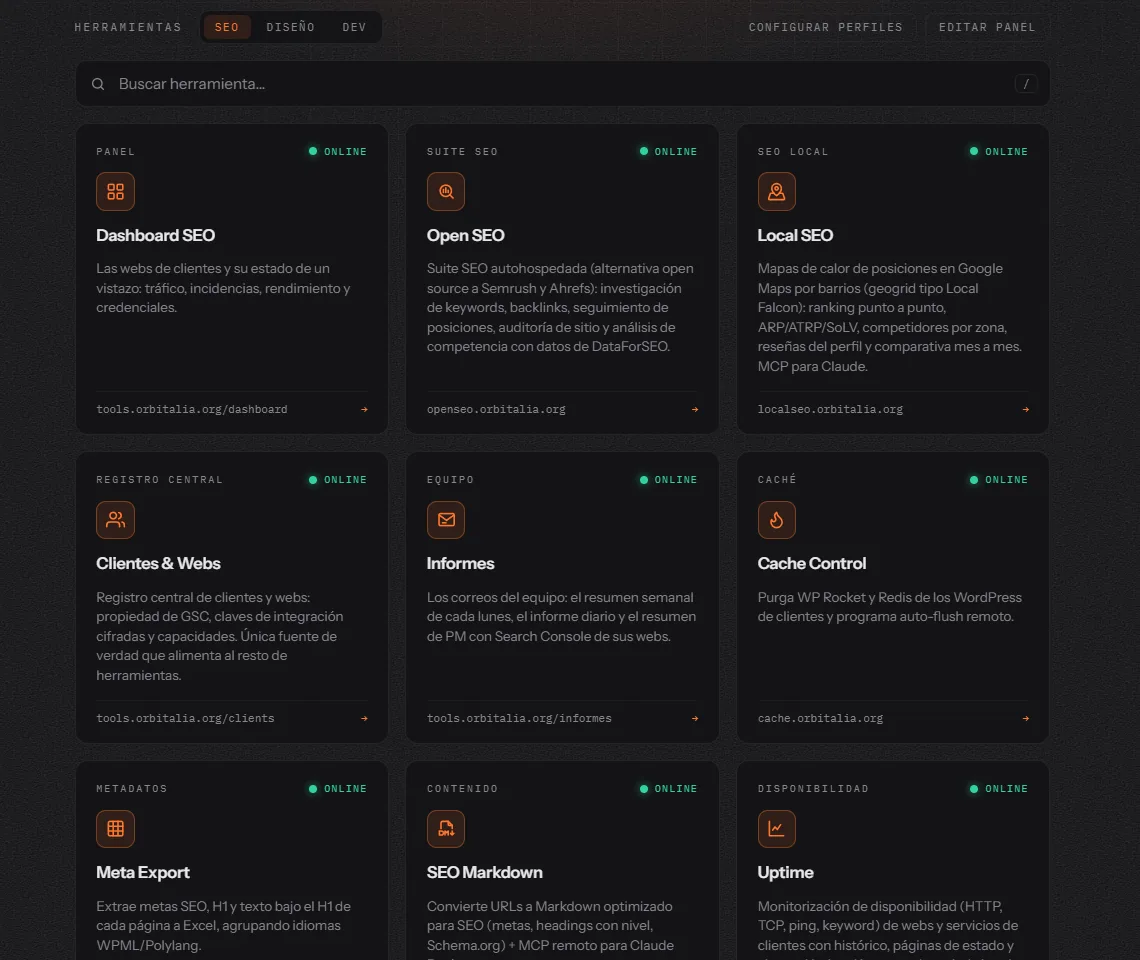
Seeing the state of every site
A dashboard with each site’s traffic, incidents and performance, and a monitor that checks each homepage every five minutes and reviews watched URLs against 15 SEO rules. If a noindex appears or a title disappears, it alerts at once.
Measuring like an SEO suite
Keyword, backlink and ranking research, and Google Maps heat maps by neighbourhood, with grids of up to 15×15 points. Also domain authority, indexing and full-site audits.
Changing things without logging into each site
Titles and descriptions, schema, images and cache are applied from one place or from Claude. Changes are validated before writing, and can be rolled back if something fails.
Working on images
Generation with several AI models, renaming and optimisation. The tool gathers each image’s real context, and a person decides with the AI which text gets applied.
Organising the team
Tasks with a timer, hours per client, reusable checklists and an email each Monday with each person’s week. It all starts from a single register of clients and websites.
Asking for it in a chat
MCP connectors to work from Claude, and its own assistant that answers from the documentation and uses some 150 actions across the tools. Each person only sees what their role allows, and everything is logged.
What we learned building it
This is what we apply on any project, because we have tested it on this one.
- First, a single source of truth. A client and their website are registered once, and every other tool reads them from there. Without that, each new program would be one more list to maintain and let go stale.
- Not everything has to be programmed. Part of the suite is existing software, such as Uptime Kuma or Unlighthouse, behind the same login. We only program what does not exist or does not fit.
- Custom does not mean free. The SEO suite still pays a provider for its data, and the AI tools pay per use. You stop paying fees for what you do not use, but these costs must be counted from the start.
- Writing requires being able to undo. When a tool changes real websites, the test run, the backup and the rollback are part of the tool. They are not an extra for later.
- A person decides what matters. AI gathers data and proposes. With images, for example, the SEO specialist decides the text. That keeps the judgement human.
- Without documentation, it cannot be maintained. Each tool has its own page: what it does, how to get in and what can fail. The assistant itself also answers from that documentation.
What we do not tell you
We do not publish its clients’ data or savings figures. We have not measured them rigorously enough to present them as results, and we would rather not invent them. For another, smaller example, see the assistant we built for Profe Lucía.
How we work
01. Understand the process
We look at how you work today, where time is lost and what would happen if nothing changed.
02. Trim the scope
We pick the part that saves you most. If an existing program solves it, we tell you.
03. Written proposal
Scope and a fixed quote. We reply within 48 working hours, after looking into it.
04. Build in stages
A first version that is really used. What comes next is decided by seeing how it works.
05. Hand over and document
With alerts if something fails, documentation and training for whoever will use it.
How much custom software costs
It depends on how many processes it covers, how many programs it connects to, who uses it and what happens if it fails. An internal tool for a small team is not a system with external clients and payments. That is why we do not publish a rate: we look at your case and give you a fixed quote in writing.
Consider what comes afterwards too. Beyond development, count hosting, any external services it uses (such as AI) and maintenance. Compare that with what you pay in fees today and the hours your team spends on the task. If the numbers do not add up, it is not worth it.
Who does the work
We are a studio from Oleiros (A Coruña, Spain) with 8 years of hands-on WordPress experience, working freelance since February 2018. You talk to the person who does the work, not to a go-between. Meetings are by video call and, if you are in the city of Barcelona, we can also meet in person. We built, and still maintain, the suite in this case.
Frequently asked questions about custom software
What is the difference between custom and bespoke software?
In practice they are the same: a program built for a company’s process. “Customised” is also sometimes used for adapting an existing program, so it is worth being clear about what is on offer.
How long does it take to develop?
It depends on the scope, which is why we prefer not to give a figure without seeing the case. What we do is start with a small first version, so you use something real soon instead of waiting for the full project.
Can it connect to the programs I already use?
Almost always, if the program has an API or lets you export data. It is one of the first things we check, because if a connection is not possible, it can change the whole approach.
Who owns the software when the project ends?
You do. You keep the logins and documented code, so another professional can continue it if you ever prefer.
Do I need WordPress?
No. We work a lot with WordPress, but custom software does not depend on it. If you have a WordPress site or shop, it can connect to it.
Can I build it myself with AI instead of commissioning it?
For a personal tool, often yes. It changes when there is client data, several people or things that cannot fail: then the hard part is permissions, backups, alerts and maintenance, not writing the code.
Tell us which process holds you back
Tell us which task you repeat and with which programs, and we reply within 48 working hours, after looking into it. If custom software does not pay off for you, we will say so too.
Your first consultation is free. We look at what you tell us and reply within 48 business hours.