Your Claude Code usage, always in sight on the desktop
A Windows widget that reads the logs Claude Code already keeps on your computer and shows how many tokens you have used today, this week and this month, what they would cost at API prices and how much of your plan limits is left.
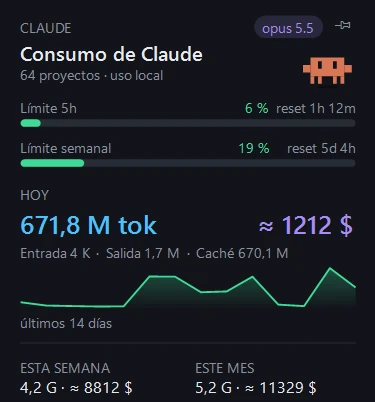
What the Claude widget shows
- Tokens for today, this week and this month, split into input, output and cache.
- Equivalent cost at API prices, worked out per model family. It is not what you pay on a subscription: it shows the real value of what you use.
- A 14-day chart, to see at a glance which days you leaned on Claude the most.
- The 5-hour and weekly plan limits, as progress bars with the time left until each one resets.
- The model you are on and how many Claude Code projects you have.
Token counts include the cache, which is most of it in long sessions: that is why the numbers are so high.
- Price
- Free, MIT licence
- System
- Windows 10 or 11, nothing else to install
- Footprint
- About 90 MB of memory and under 0.1% CPU
- Data
- The Claude widget reads local files and connects to nothing
What it needs
- Tokens, cost and chart: just having used Claude Code on that computer. The widget reads the local logs and needs no API key, open session or plugins.
- The 5-hour and weekly bars: a Pro or Max subscription and the sub-meter plugin from better-claude (midudev), which stores that reading. With an API key there are no limits to show.
- The bars update each time Claude Code replies, so while you are not using it they show the last reading.
How to install it
- Download or clone the GitHub repository.
- Run install.ps1 with PowerShell. It needs no admin rights: it builds the widgets with the compiler Windows already ships, creates the shortcut and starts them when you sign in.
- For the limit bars, install sub-meter in Claude Code: /plugin marketplace add midudev/better-claude and then /plugin install sub-meter@better-claude.
It works with Smart App Control on: it is not an unsigned .exe but a library loaded inside PowerShell. There is no need to turn it off.
And two more widgets
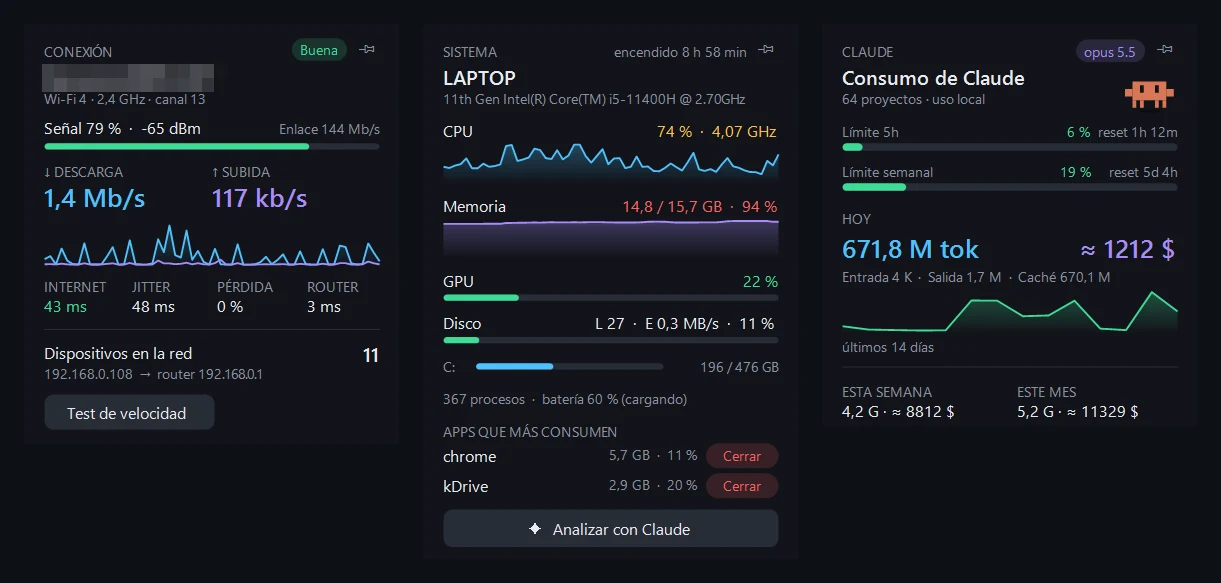
They run in the same process and you can show or hide each one.
- Connection: Wi-Fi and signal, live download and upload, latency, jitter, packet loss, devices on the network and a speed test.
- System: CPU, memory, GPU, disk, battery and the heaviest apps, with a button to close them and a PC check done with Claude.
Your data stays on your computer
- The Claude widget only reads the Claude Code logs in your user folder, and only the new part of each file.
- It sends nothing to any server. The only feature that uses Claude is the PC check in the System widget, and only when you press the button: it runs on your subscription through Claude Code, with no API key.
We use it every day at the studio, where we work with Claude Code.
Frequently asked questions
Is this what Anthropic charges me?
No. On a subscription you pay a flat fee. The widget works out what that usage would cost at API prices, so you can see the value of what you use.
Why do the limit bars say «sin datos» (no data)?
The sub-meter plugin from better-claude is missing, or you have not used Claude Code since installing it. They appear after the first reply.
Is the interface in English?
No, the widgets are in Spanish for now. The labels are short and the numbers speak for themselves.
Does it work on Mac or Linux?
No. It is built on native Windows APIs.
Can I use only the Claude widget?
Yes. Right-click a widget or the tray icon to show or hide each one.
How do I uninstall it?
Run install.ps1 -Uninstall. It removes the autostart, the shortcuts and the files, and keeps your settings.
Want a tool like this for your team?
We build custom software around the way you work: desktop tools, browser extensions, WordPress plugins and AI integrations. Your code, fixed quote.
Your first consultation is free. We look at what you tell us and reply within 48 business hours.