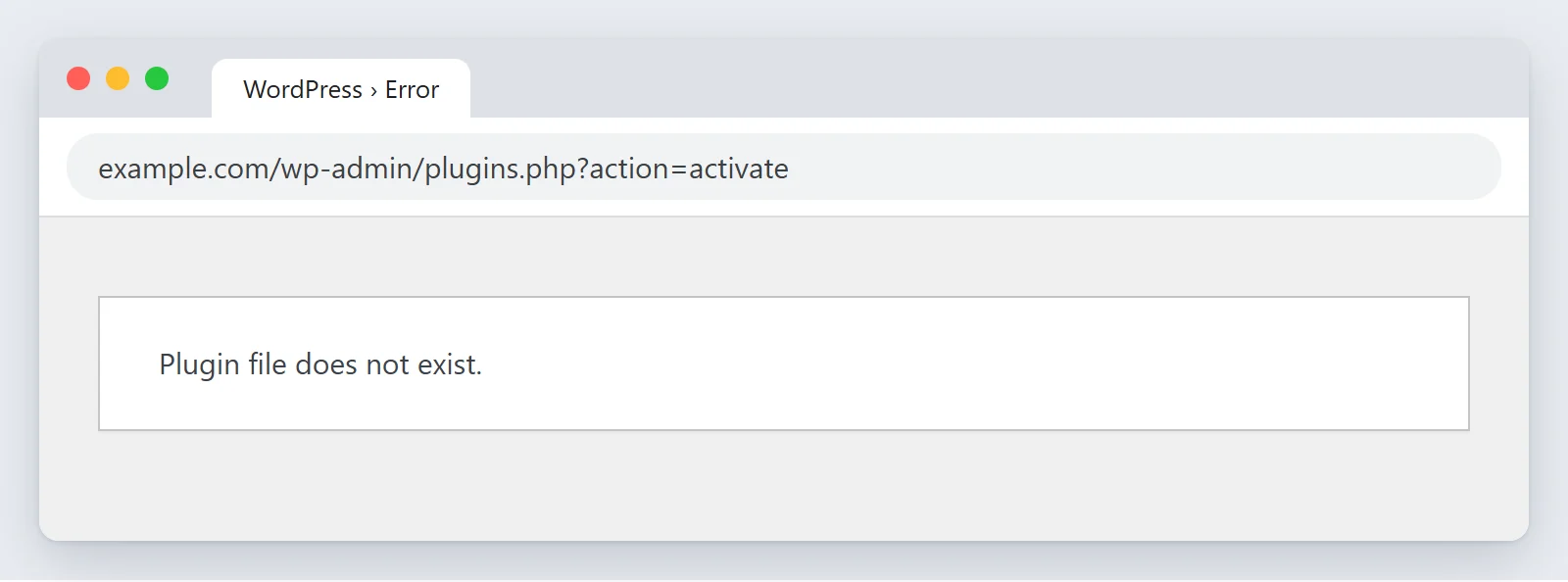
You upload a plugin zip, WordPress installs it and, when you click "Activate", it replies "Plugin file does not exist." On your computer the zip opens fine and the folder is there. The problem is invisible: it lies in how the zip was made.
It used to happen to us. We build custom WordPress plugins and package almost all of them with Claude Code. Each time, Claude made the zip its own way: sometimes with PowerShell's Compress-Archive, sometimes with a different script. And sometimes, when we uploaded a new version of a plugin with a feature added, WordPress replied that the plugin file does not exist. That is why we built WP Plugin Zip, a Claude skill that packages the plugin with a script that checks the same things WordPress checks.
The messages you see in WordPress
These are WordPress's exact strings. We took them from the WordPress source code:
Message | When it appears |
|---|---|
Plugin file does not exist. | When activating the plugin |
The package could not be installed. No valid plugins were found. | When uploading the zip |
The plugin generated 3 characters of unexpected output during activation. | When activating; usually followed by "headers already sent" warnings |
The theme is missing the style.css stylesheet. | When uploading a theme |
Destination folder already exists. | When uploading a plugin that is already installed |
Why it happens: the six causes
WordPress does not open the zip the way your file manager does. It looks for a folder named after the plugin and, inside it, a PHP file with a Plugin Name: header. According to the WordPress developer reference, that header is only searched for in the first 8 KB of the file. If any of that fails, the plugin "does not exist", even if the code is fine.
1. \ separators from Compress-Archive
A zip stores paths as text. The standard uses / (my-plugin/my-plugin.php). Compress-Archive in Windows PowerShell 5.1, the version that ships with Windows, writes \. We checked it on Windows 11 with the Microsoft.PowerShell.Archive 1.0.1.0 module: the zip contains my-plugin\my-plugin.php.
On a Linux server, \ does not separate folders: it is just another character in the name. WordPress creates a single file literally called my-plugin\my-plugin.php instead of a folder, and activation replies "Plugin file does not exist". Microsoft fixed the module in 2019 (pull request #62) and PowerShell 7 ships a later version, but Windows PowerShell 5.1 still comes with the old one.
2. A BOM before <?php
A BOM is 3 invisible bytes some editors add at the start of a UTF-8 file. PHP prints them before running anything. On activation, WordPress detects that output and warns about "unexpected output". Then "headers already sent" errors turn up in redirects, logins or feeds.
3. The main file one folder too deep
This happens when you compress the folder that contains the plugin folder: my-plugin-1.4.0/my-plugin/my-plugin.php. WordPress only looks one level down. It does not find the header and the package is rejected.
4. The header past the first 8 KB
If a very long licence comment or code comes before Plugin Name:, WordPress never reads it. As far as it is concerned, that file is not a plugin.
5. GitHub's "Download ZIP"
GitHub names the folder after the repository and the branch: my-plugin-main. WordPress uses the folder name as the plugin's identifier (its slug). The plugin installs, but as a different one from my-plugin: updates no longer match what is installed.
6. A zip of zips
Many marketplaces deliver a package with the plugin, the documentation and the licences, each in its own folder. The plugin zip is inside. If you upload the whole package, WordPress replies "No valid plugins were found".
Symptom, cause and fix
Symptom | Cause | Fix |
|---|---|---|
Plugin file does not exist |
| Rebuild the zip with |
No valid plugins were found | Zip of zips, or no | Unzip the package and upload the inner zip |
Unexpected output / headers already sent | BOM or blank lines before | Save the file as UTF-8 without BOM |
The theme is missing the stylesheet |
| Compress the theme folder directly |
Plugin shows up twice or will not update |
| Rename the folder to the slug before compressing |
Why a Claude skill
A Claude skill is a folder with a SKILL.md file: instructions for Claude and, when needed, scripts. Claude only reads its description at the start and loads the rest when the task calls for it. If the skill includes a script, Claude runs it and only sees its output, as Anthropic's documentation explains.
That is exactly what we needed. Packaging a plugin should not depend on what Claude decides that day. With the skill, when you ask it to "package the plugin", Claude always runs the same script, which checks what WordPress will check and refuses to write a zip that would not install. We use it for every release of our plugins.
What WP Plugin Zip does
The wp_zip.py script has two commands: build creates the zip and check reviews any zip you already have.
build packages a folder:
- Creates a single folder named after the slug (the
my-plugin/folder givesmy-plugin.zip). - Writes paths with
/and adds explicit folder entries. - Leaves out the junk:
.git,node_modules,.DS_Store,Thumbs.db,desktop.ini, other.zipfiles,.mapfiles and logs. - Converts Windows line endings (CRLF) to LF inside the zip.
- Does not write the zip if there is no
Plugin Name:header in the first 8 KB (orTheme Name:instyle.cssfor themes), or if a PHP file has a BOM or is UTF-16. - With
--lint, runsphp -lon every PHP file and stops on a syntax error. - When it finishes, shows the plugin's name, version and author. If the version is not the one you just bumped, you are about to ship an old zip.
This is the result for a test plugin with CRLF line endings, node_modules, .git, .DS_Store and a log file:
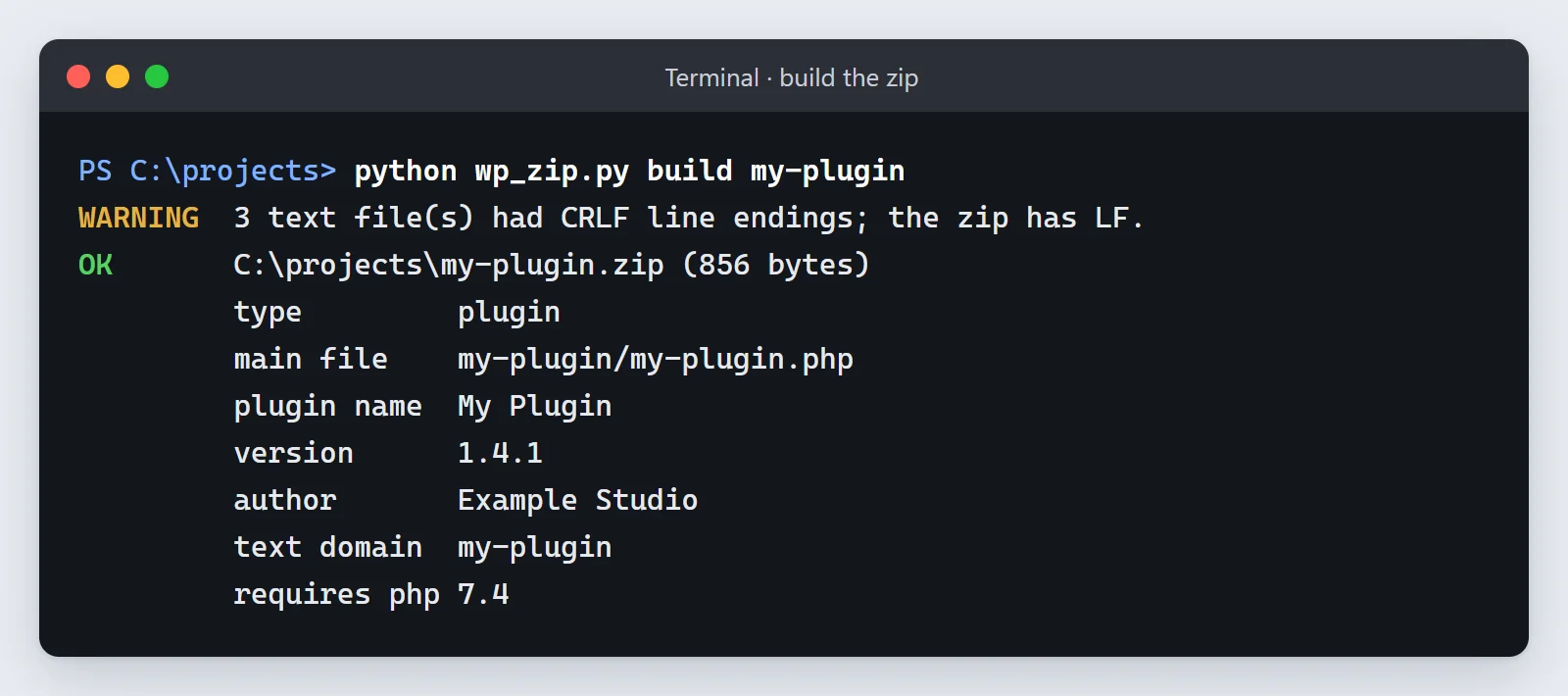
WARNING  3 text file(s) had CRLF line endings; the zip has LF.
OK       C:\projects\my-plugin.zip (856 bytes)
         type         plugin
         main file    my-plugin/my-plugin.php
         plugin name  My Plugin
         version      1.4.1
         author       Example Studio
         text domain  my-plugin
         requires php 7.4
Only my-plugin/, its subfolders and the plugin's three files end up in the zip. The junk stays out.
check reviews an existing zip: yours, a client's or a marketplace download. It returns 0 if it can be installed and 1 if it has errors.
Three examples with check
We built these test zips and ran check on them. The output is verbatim.
A zip made with Compress-Archive
ERROR    entry names use "\". WordPress on Linux creates a flat file called "slug\slug.php" instead of a folder ("Plugin file does not exist"). Rebuild with this script, not Compress-Archive.

Not installable: fix the errors above.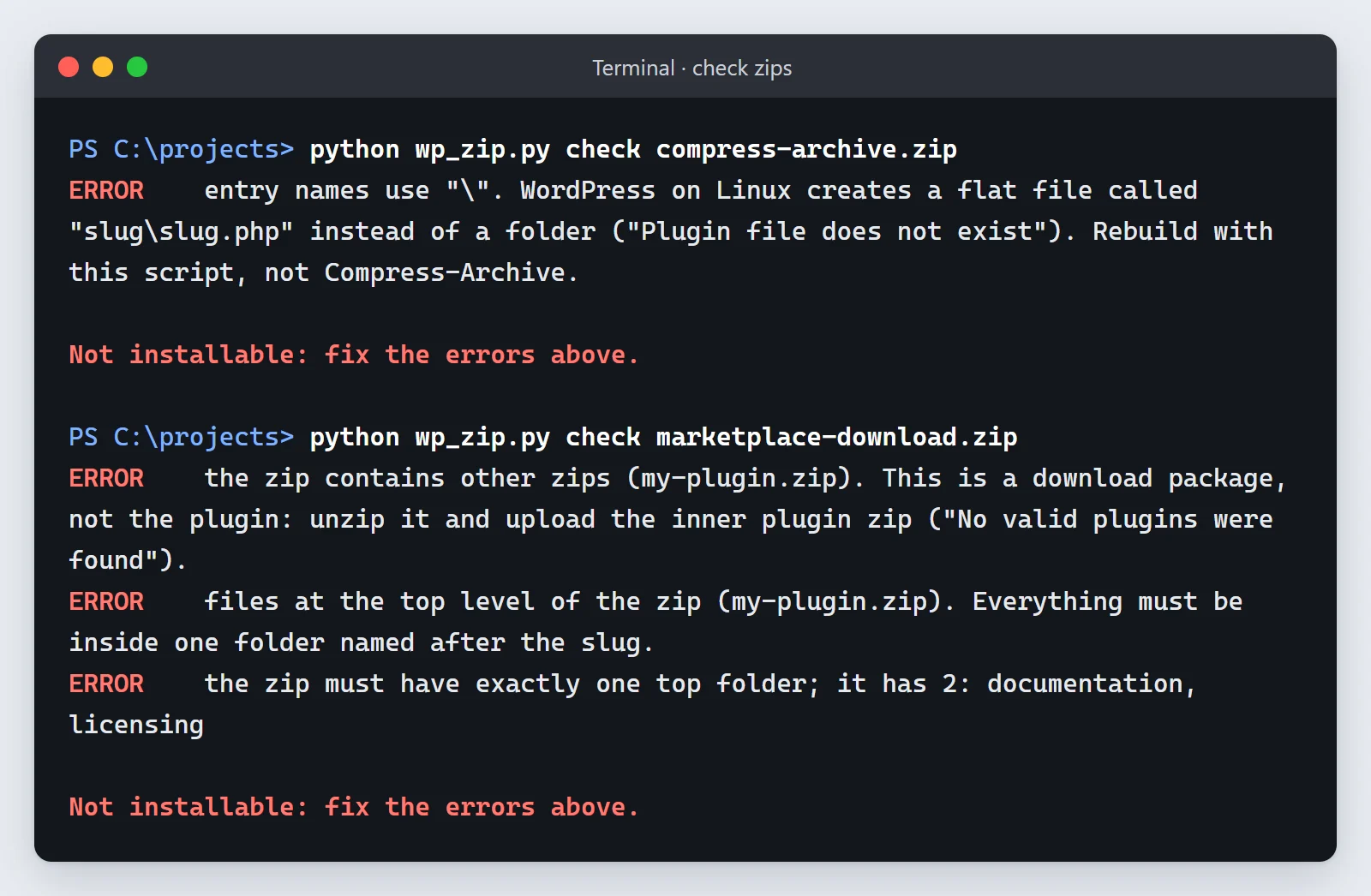
A full marketplace download
ERROR    the zip contains other zips (my-plugin.zip). This is a download package, not the plugin: unzip it and upload the inner plugin zip ("No valid plugins were found").
ERROR    files at the top level of the zip (my-plugin.zip). Everything must be inside one folder named after the slug.
ERROR    the zip must have exactly one top folder; it has 2: documentation, licensing
GitHub's "Download ZIP"
WARNING  the folder is "my-plugin-main". WordPress will use it as the slug, so updates will not match the installed plugin. Rename it to the plain slug (GitHub "Download ZIP" adds -main).
WARNING  junk files in the zip: my-plugin-main/.gitignore
OK       installable
This one installs, which is why it is a warning and not an error. But it would end up as a different plugin from my-plugin.
The script also detects a BOM (starts with a UTF-8 BOM: PHP prints it before <?php ("headers already sent")) and a main file one folder too deep (the main file is one folder too deep), and tells you which folder to compress.
How to install it
In Claude Code, as a plugin:
/plugin marketplace add agenciaRSE/wp-plugin-zip
/plugin install wp-plugin-zip@wp-plugin-zip
Or copy the repository's skills/wp-plugin-zip folder into ~/.claude/skills/. Then ask in your own words: "package the plugin", "make the release zip" or "why does this zip say Plugin file does not exist?".
In Claude Desktop and claude.ai, download wp-plugin-zip.zip from the latest release on GitHub and upload it in Settings → Capabilities → Skills. In chats it checks and builds zips you upload to the conversation; in the Code tab it works on your own folders.
Without Claude, the script works on its own:
python wp_zip.py build my-plugin --lint
python wp_zip.py check my-plugin.zip
The code is on GitHub under the MIT licence. It uses only Python's standard library: it installs nothing and connects to nothing. The details are on the WP Plugin Zip page.
Limits
- It needs Python 3. If
pythondoes not work on your machine, trypython3orpy. - Syntax checking needs PHP on the PATH. With
--lint, if it cannot find it, it warns--lint skipped: php is not on the PATH.and builds the zip anyway, without checking syntax. - It does not fix the plugin's code. It checks that the package installs and activates, not that the plugin works well or is secure.
- It does not repair someone else's zip.
checktells you what is wrong; to fix it, unzip it and rebuild it withbuild.
If it is happening to you right now
- Run
checkon the failing zip. It will tell you which of the six causes it is. - If it is a marketplace package, unzip it and upload the plugin zip inside.
- If it is your own plugin, rebuild the zip from the folder with
buildand check that the version in the summary is the one you expect.
If you keep giving Claude the same instructions for a team task, that can become a skill too: see how we work on custom Claude skills. And if what you need is the plugin itself, we build custom WordPress plugins.
Written by Diego Meijide, AGENCIA RSE. Tested on 10 November 2026 with WP Plugin Zip 1.0.0 and Windows PowerShell 5.1.