AI Translator for WPML: translate in the WPML editor with your own AI
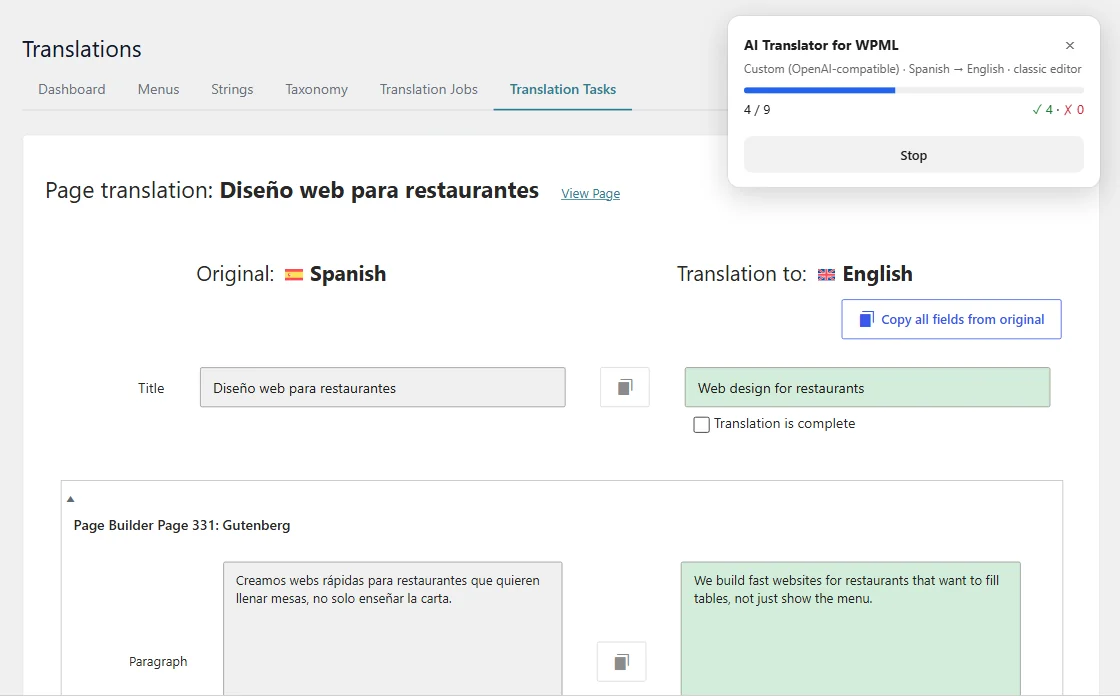
You open a translation in WPML, click once, and the extension fills in the pending fields with the AI model you have chosen. You read through the result and save it as usual. It uses your own API key, so you pay your provider directly for the AI.
- Editors
- WPML classic editor and Advanced Translation Editor (ATE)
- AI
- Gemini, Claude, OpenAI, Mistral, DeepSeek, OpenRouter or any OpenAI-compatible service
- Requires
- Chrome 116 or later, WPML on your site and an API key (optional for local models)
- Languages
- Interface in English and Spanish
- Privacy
- Your texts go from your browser to your AI provider, with no server of ours in between
- Price
- The extension is free. You pay your provider for the AI
Why use your own API key with WPML
- You choose the model, and you can change it whenever a better or cheaper one comes out.
- You can give it your glossary and your tone: which names stay as they are, which term you prefer, how you address the reader.
- Nothing is saved until you say so. The translation stays in the editor for you to correct.
- It also works with models running on your own computer, through Ollama or LM Studio.
How to translate a page
- Install the extension from the Chrome Web Store, click its icon and open the settings.
- Paste the API key of your provider, click "Test key and list models" and choose "Use this provider". If your project has a glossary, add it there too.
- In WordPress, open a translation in the WPML editor. The extension detects the source and target languages, and you can also set them by hand.
- Click the icon and then "Translate pending fields". A panel shows the progress, and you can stop it at any time.
- Check the fields, especially the orange ones, and save in WPML. If any are left in red, run it again: fields already marked as complete are skipped.
What it does while it translates
- It checks every answer before pasting it. If the text comes back too short or too long, or the HTML tags do not match, it tries the next model on your list. When none of them gives a clean answer, it pastes the first one and highlights it in orange.
- It splits long fields at safe points in the HTML, and if one block fails it leaves the whole field pending. You never end up with half a text.
- It translates repeated texts once per run, such as a button that appears several times on the same page.
- It moves to the next model when one is overloaded, reaches its limit or runs out of quota.
- It can mark fields as complete in the classic editor, except the orange ones. This includes fields you had already translated by hand. In ATE you confirm each segment yourself.
- It turns curly quotes and apostrophes into straight ones, because databases without utf8mb4 can save them as "?". In Catalan, with all its l' and d', you notice it straight away. You can turn this off.
When to use it and when not to
- It suits you if you translate a few pages at a time and want to read them before publishing.
- Check the AI words included with your WPML plan first. According to its pricing page (November 2026), Multilingual CMS comes with 22,500 and Multilingual Agency with 45,000. If that covers your site, you may not need anything else.
- For legal, medical or contract texts, have someone who knows both the language and the subject review them. The automatic check catches cut-off text and lost tags, but it cannot tell whether a term is right.
You still need WPML. AI Translator for WPML is an OpenVault product and is not affiliated with or endorsed by WPML or OnTheGoSystems.
If you have the whole site to translate
The extension works on one translation at a time, with the editor open. When there are dozens of pages, or they change often, the Pro version saves you from opening them one by one. It is a WordPress plugin that finds what is missing or out of date, estimates the cost with your model and translates it in the background using WPML's own jobs.
It has a translation memory, so when you edit a page only the new text goes to the AI. It shows your spend by month and language, and the key is stored encrypted on the server for the whole team. Answers that look wrong are kept for review and are not published. We have tested it with the block editor, Elementor, WPBakery and Beaver Builder Lite. Elementor also needs WPML String Translation.
It comes with a yearly licence for one site or five, and the current price is on its page.
See AI Translator for WPML Pro (opens in a new tab)Where your texts and your key go
- The texts you translate and your project instructions go from your browser to the AI provider you choose, whose own terms apply. Neither AGENCIA RSE nor OpenVault receives them.
- Your API keys are stored only in your browser. They are not synced with your Google account, and the WPML page never sees them.
- The extension only accesses the tab where you use it, and only when you use it. It has no analytics or advertising.
Built by AGENCIA RSE and published under OpenVault, our WordPress plugin brand. See all our extensions
Frequently asked questions
Do I need a WPML plan to use it?
You need WPML on your site, with its translation editor available. The extension fills in that editor, but it does not replace WPML.
Does it use my WPML translation allowance?
The extension does not use WPML's automatic translation: the requests go to your AI provider with your key. If you also have automatic translation turned on in WPML, that is counted separately.
How much does it cost to translate a page?
It depends on the length of the text, the language and the model. Your provider bills you for usage and shows it in your account. The extension itself is free and adds no charge.
Can I use my ChatGPT or Claude subscription?
No. You need an API key, which is billed separately from those subscriptions.
Does it work with the Advanced Translation Editor (ATE)?
Yes, it fills in the segments that are still pending. You then confirm them yourself, because only the classic editor lets the extension mark fields as complete.
Does it publish the translation?
No. It leaves the text in the editor, and you decide when to save it in WPML. If you have chosen to mark fields as complete, check them before saving.
How is the Pro version different?
The extension translates the editor you have open. Pro is a WordPress plugin that translates many pages in the background, remembers what it has already translated and shows what you spend.
Need a custom extension?
We build browser extensions to order for teams that repeat the same task in the browser every day: Manifest V3, Chrome, Edge and Firefox, published and maintained.
Your first consultation is free. We look at what you tell us and reply within 48 business hours.