If your site runs WP Rocket, check the version now. If it is older than 3.24.2, update before you read on.
On 26 November 2026 we watched this flaw being exploited on a site we maintain. The attacker uploaded a webshell without logging in, read wp-config.php, created two administrators and left a backdoor. The same day they tried three other sites we look after with Orbitalia, the SEO agency we work with: on one they managed to write their file, and on the other two they bounced off. Here is what happened and what you can check on your own site. We are not naming the client or anything that could identify them.
What the flaw is, and how quickly it was used
It is CVE-2026-125812. Patchstack rates it as unauthenticated remote code execution, 9.8 out of 10. According to ZeroPath's analysis, the problem lies in how WP Rocket builds its cache paths: with a crafted URL, the attacker decides where a file gets written on disk, and can then run it.
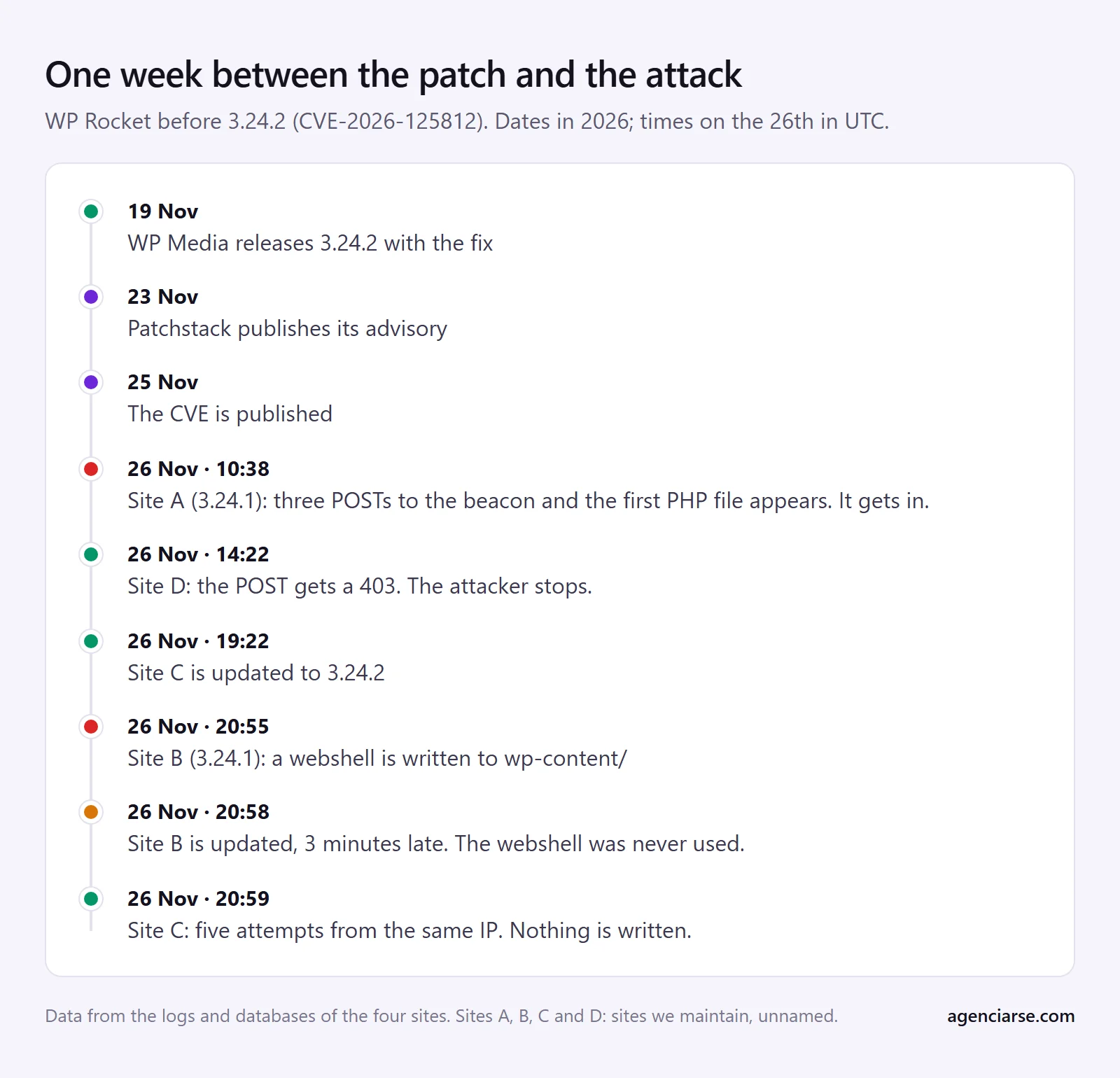
WP Media released 3.24.2 with the fix on 19 November. Patchstack published its advisory on the 23rd, the CVE came out on the 25th, and on the 26th we were already seeing it on four sites. A week after the patch, and barely a day after the flaw went public.
How they got in, and how we found out
WP Rocket has a performance beacon, a small script that every visitor's browser sends to admin-ajax.php with data about the page: the LCP element, the fonts it uses, external domains. Since visitors send it, it does not require a login. The attacker used that request to slip fake URLs into the beacon tables, and that was enough to get WP Rocket to write one of their PHP files onto the site.
The server log showed the same sequence every time. First they visited the home page and the sitemaps to get the list of pages. Then they loaded a public page, usually one of the legal ones, to grab the beacon's nonce, and sent a POST to admin-ajax.php for each page. Finally they requested the file they had just written, to check it was there.
Finding the way in took a while, because the log does not keep the body of POST requests. The proof turned up in the database: WP Rocket's tables had three rows created in the same second as the attacker's three POST requests, each with a supposed font that actually pointed to one of their servers dressed up as Google Fonts. Seven seconds after the third POST, their first PHP file appeared in wp-content/.
Once inside, they had about three and a half hours. They wrote a webshell to run commands from the URL and launched gsocket, a tunnelling tool that gave them a console on the server (nothing done through it shows up in the site's log). They read the whole of wp-config.php, with the database password, the WordPress keys and a key for an external service. They created two administrators with a direct INSERT into the database, something no security plugin sees because it bypasses WordPress, though they never managed to log in with them. They downloaded a 587 KB backdoor into the site root and, before leaving, deleted their webshells.
What gave them away was a slip of their own. Their first attempt to create an administrator broke a WordPress global variable and caused a fatal error. That site had a small plugin of ours that emails us every fatal error, and that email is what reached us. Without it we would have found out late, or never: the site's security plugin, firewall and all, saw nothing, because the flaw was new and the request looked normal.
What happened that day on three other sites
Since the attack was clearly automated, that same afternoon we checked every site we maintain. We looked at the WP Rocket version, the beacon tables, stray PHP files in the root, in wp-content and in uploads, the administrators (also reading them straight from the database) and the server logs. Most were already on 3.24.2 and clean, but three showed traces of the same attacker.

On site B a webshell appeared in wp-content/ at 20:55 UTC. WP Rocket was updated at 20:58, three minutes too late. Our new-PHP alarm caught it, we removed it, and the log confirms nobody ever used it. On site C there were five attempts from the same IP at 20:59, one per legal page; the poisoned rows stayed in the database, but no file was written because it had been on 3.24.2 since 19:22. And on site D the first POST, at 14:22, got a 403 and the attacker did not try again.
Same request, same day. Between the site that fell and the one that was spared there was, in one case, an hour and a half.
How to tell if you were hit
It is worth checking even if you are already on 3.24.2, because updating closes the door but does not throw out whoever already came in.
Start by confirming under Plugins that WP Rocket is on 3.24.2 or later. Then look for odd URLs in the beacon tables (wp_wpr_*, although your prefix may differ), especially wpr_preload_fonts and wpr_preconnect_external_domains: domains that are neither yours nor Google's, trycloudflare.com, IP addresses, ../ or paths ending in .php. This query only reads:
SELECT id, url, created_at FROM wp_wpr_preload_fonts
WHERE fonts LIKE '%trycloudflare%' OR fonts LIKE '%../%' OR fonts LIKE '%.php%'
ORDER BY created_at DESC;
For wpr_preconnect_external_domains it is the same, replacing fonts with domains.
Also look for stray .php files in the root of wp-content/ (apart from index.php, advanced-cache.php or object-cache.php), in uploads/ or in the site root that are not part of WordPress, and hidden files starting with a dot, especially anything dated after 19 November. Compare the user list in the dashboard with a direct query on wp_usermeta (the wp_capabilities key containing administrator), because an administrator created through SQL may not be where you expect. And if you can read the server logs, look for several POST /wp-admin/admin-ajax.php in a row from an IP that has just read the sitemaps and legal pages, or requests to /wp-content/plugins/wp-rocket/languages/ with a random file name, which is how they checked whether they could write.
If you find odd rows but no file and nothing in the log, it is probably a failed attempt like the one on site C. If you find a PHP file you do not recognise, do not delete it yet: take a copy first.
If you were hit
In the first hour, in this order, we cut off their access: we killed their processes, moved their files to a folder with no web access (we did not delete them, they are evidence) and stripped the fake administrators of their permissions. Then we blocked PHP from running in uploads/, in the root of wp-content/ and in hidden files through .htaccess, and disabled the functions that launch programs (exec, shell_exec, system, proc_open…) in php.ini, after checking which plugins used them.
After that we changed the administrator and database passwords. Change the database one in the hosting panel first and only then in wp-config.php; we did it the other way round and the site returned a 500 error for a minute, because in PHP 8 mysqli_connect() with a wrong password throws an exception that @ does not silence.
If the attacker read wp-config.php and the database, assume they have every key: payments, email, storage, remote management connectors. All of them need rotating. To avoid an outage, create the new key first, check it works and retire the old one last; PayPal and most cloud services let you have two at once.
And if they could dump the database and it holds customer data, it may be a personal data breach under the GDPR. The data controller has 72 hours from becoming aware to decide whether to notify the supervisory authority. In our case the client knew from the very first moment and we decided every step together. If the malware comes back after cleaning, we explain why that happens and in what order to clean up.
What we have changed
A firewall cannot stop a flaw nobody knows about yet, so we have put the effort into finding out sooner. We now get an alert the moment a new administrator appears (including one created through SQL: we check the database every 5 minutes), a new PHP file shows up in the root or in wp-content, a plugin is installed, an administrator's role or email changes, or a fatal error comes from injected code. Every hour we also check the PHP files in uploads, core files that do not match their checksums, odd processes on the server and webshell-like requests in the log. On the sites that only we and the client administer, we have also locked down administrators: any other user with that role loses the dangerous permissions, even if it was granted through SQL. We tested it by replaying the attack.
If you are building your own fatal error alert, here is something that cost us an afternoon: since WordPress 5.2 the fatal error handler cuts off the shutdown functions that come after it, so your own register_shutdown_function never runs. You have to hook into the wp_should_handle_php_error filter.
What this day taught us most is how little time there is. A week passed between the patch and the attack, and an hour and a half between a compromised site and a safe one. Critical security updates cannot wait for the end-of-month review. And if your site does not tell you when it hits a fatal error, start there, because sometimes it is the only thing that gives an intruder away.
If you want us to check your WordPress for this flaw, or to make sure the next one does not catch you out, take a look at our WordPress maintenance. And if it has already happened, at our malware removal.