If you work with Claude Code, you have probably been here: Claude gives you a command, you select it with the mouse, paste it into another terminal and it does not do what you expected. Or you paste an email it drafted and the lines arrive cut off mid-sentence. At AGENCIA RSE we use Claude Code every day, and it happened so often that we wrote a Claude skill to stop it: Auto Clipboard.
Why text copied from the Claude Code terminal breaks
The Claude Code terminal wraps long lines with real line breaks and indentation. When a line does not fit the width of the window, it carries on to the next line with spaces in front. On screen it looks like one wrapped line; when you select it with the mouse, you copy those line breaks and spaces too.
For text you only read, it does not matter. For a command, it is dangerous:
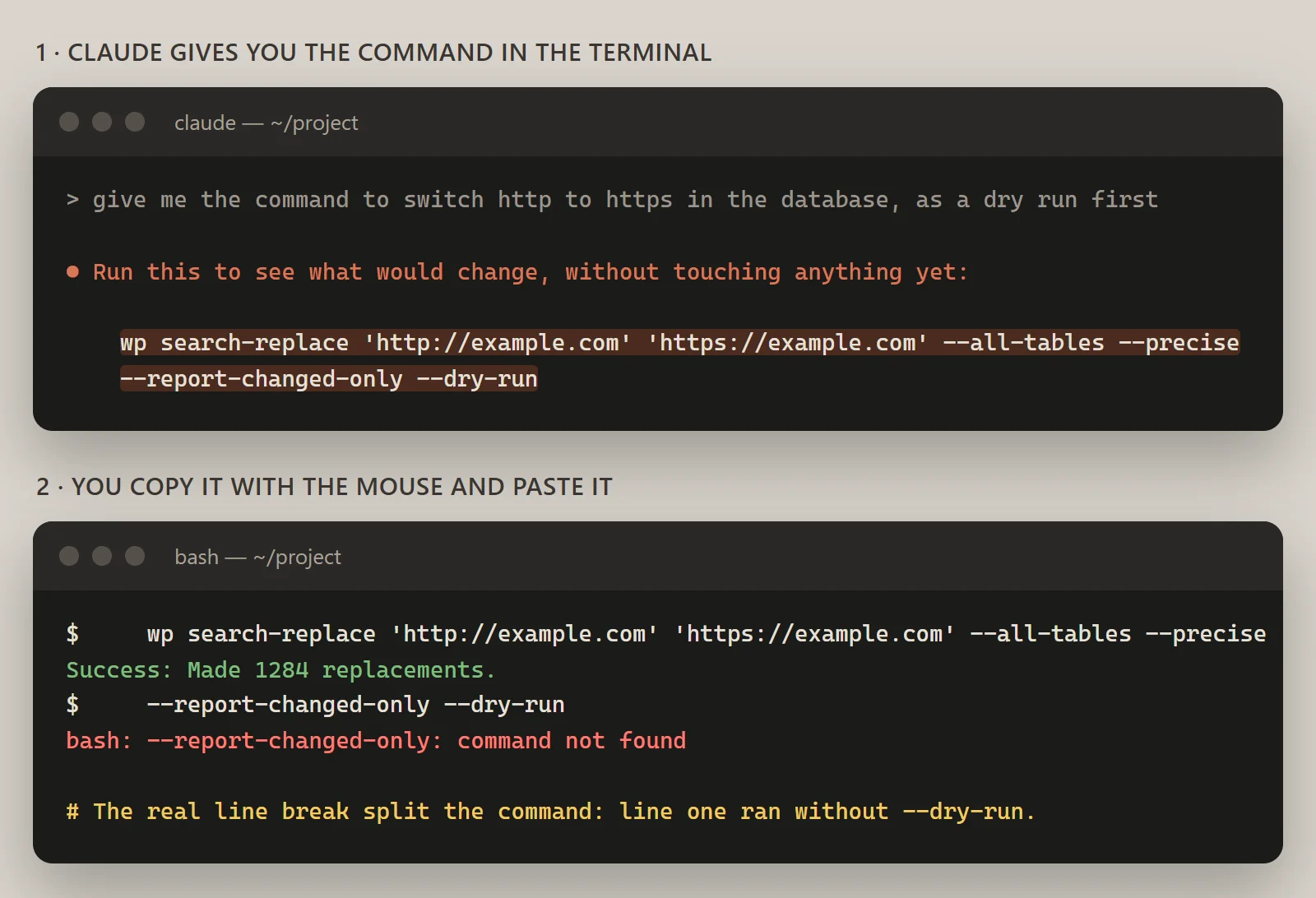
In the example, Claude suggests a wp search-replace as a dry run. The terminal wraps it just before --dry-run. When you paste it and press Enter (or as soon as you paste, in terminals that run pasted text straight away), the shell sees two commands: the first one makes the replacements for real and the second one fails. The dry run was lost to a line break nobody typed.
Other cases keep coming up:
- A split option. If the break lands inside a path or an argument, the command fails or does something else.
- Emails and texts with extra breaks. Text pasted into Gmail or your website editor carries the terminal's breaks and indentation with it.
- Accents that come out as
ñ. In UTF-8, ñ is two bytes. If a step along the way reads them with the Windows encoding (Windows-1252), you get two characters:Ãand±. On Windows this happens, for example, when text is piped intoclip.exefrom PowerShell 5.1, which is exactly the first thing an AI would try to copy something for you. - Passwords in your history. If you ask Claude for a password and it writes it in the reply, it stays in the conversation. Copy it on Windows and it also lands in clipboard history (Win+V).
What a Claude skill is, and why a skill
A Claude skill is a folder with a SKILL.md file: instructions for Claude and, where needed, scripts. Claude keeps only each skill's name and description in mind and loads the rest when a task calls for it, according to Anthropic's Agent Skills documentation. Skills work in Claude Code, Claude Desktop and claude.ai.
Before the skill we used something else: AI Terminal Code Cleaner, a desktop app that cleaned text after you copied it. It worked, but it came too late: first you copied the broken text, then you fixed it. Auto Clipboard replaces it because it tackles the problem at the source. If Claude puts the text on your clipboard, you never copy from the terminal at all.
A skill fits here for two reasons. Claude decides when to copy, because it knows which part of its reply is meant to be pasted. And the delicate work (generating a password, writing to the Windows clipboard without mangling accents) is done by a script that gives the same result every time.
What Auto Clipboard does
Auto Clipboard copies to your clipboard, without asking, anything Claude gives you to paste somewhere else, still shows it in the reply and adds one line: 📋 Copied to clipboard.
When it copies and when it does not
Copies | Does not copy |
|---|---|
Commands to run, including | Illustrative examples you are not meant to run |
Code to paste into a file, console or admin panel | Code Claude has already written into your files |
Emails, messages, texts for a website or a form | Logs, reports and explanations you only read |
Paths, URLs, config blocks, SQL queries, regexes | |
Passwords it generates (see below) |
If a reply has several pieces, it copies the one you will use first and tells you which. The others, when you ask.
Exactly what text it copies
The copied text is ready to paste:
- no Markdown fences (
` ` `) and no added indentation; - no
$or>prompt; - straight quotes and dashes in commands and code, never typographic ones;
- no trailing newline, so a command does not run the moment you paste it, before you have checked it.
We tested it: give clip.py a command ending in two line breaks and it puts the command on the clipboard without them, accents intact.
How it copies on each system
Claude uses the first method available:
System | Method |
|---|---|
Windows |
|
macOS |
|
Linux |
|
WSL |
|
clip.py uses Python's standard library only, makes no network connections and writes no files. Claude passes it the text through a quoted heredoc, so the shell expands nothing inside it.
Passwords that never go through the chat
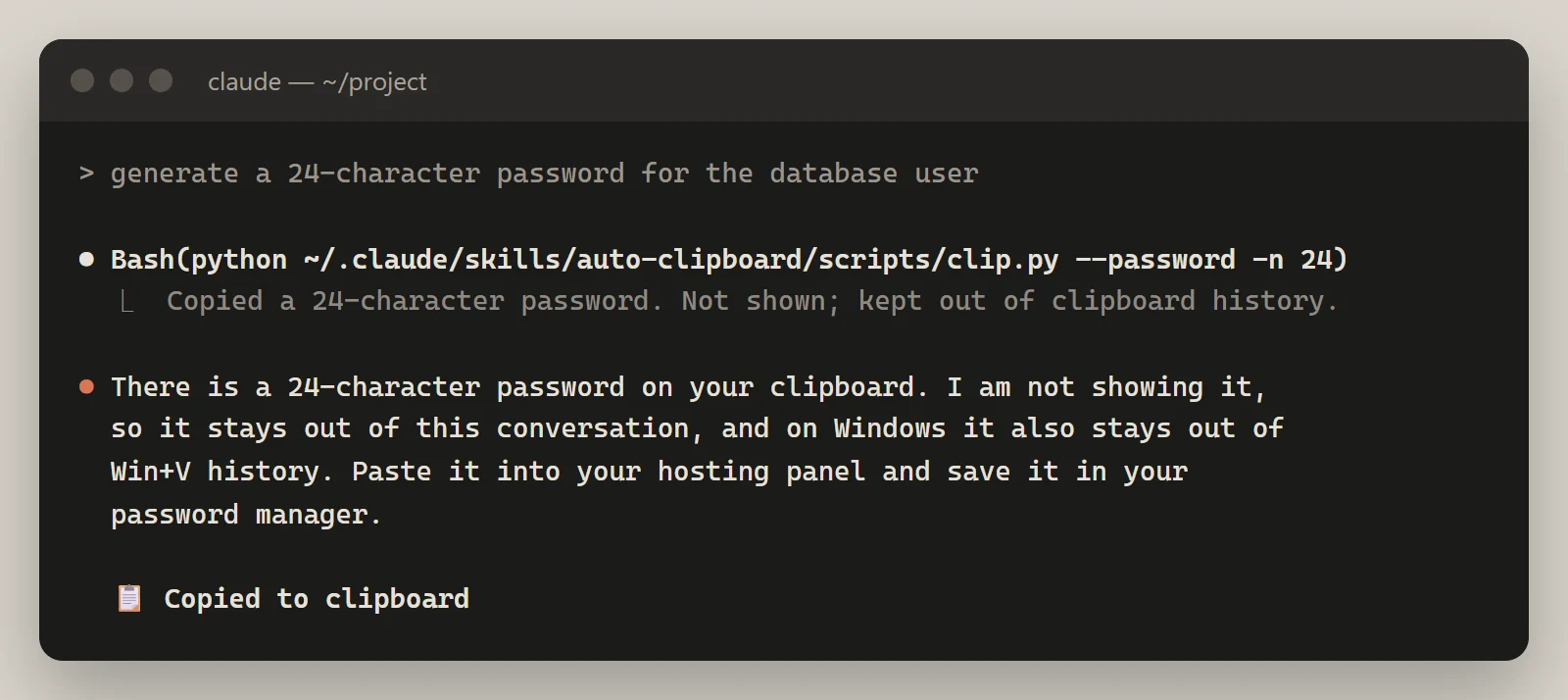
Passwords are generated on your machine, not by the model. When you ask for one, Claude runs clip.py --password, which creates it with Python's secrets module, copies it and does not print it. The password never passes through the model and never appears in the conversation.
By default it is 24 characters long, with lower case, upper case, digits and these symbols: ! # % + - . : = ? @ _ ~. If a site rejects symbols, use --no-symbols; if it needs another length, -n.
On Windows it also copies it as sensitive content: it tags the clipboard with the formats Windows recognises to keep an item out of clipboard history and cloud sync. Keys you already have (an API key, a token) are copied the same way with --sensitive.
Three examples
1. A long command. You ask for the wp search-replace from earlier. Claude shows it in the reply and puts it on your clipboard as a single line, with no indentation and no trailing newline. You paste it, check that --dry-run is there and press Enter yourself.
2. An email. You ask it to write to your host requesting SSH access. Claude copies it with the script and tells you:
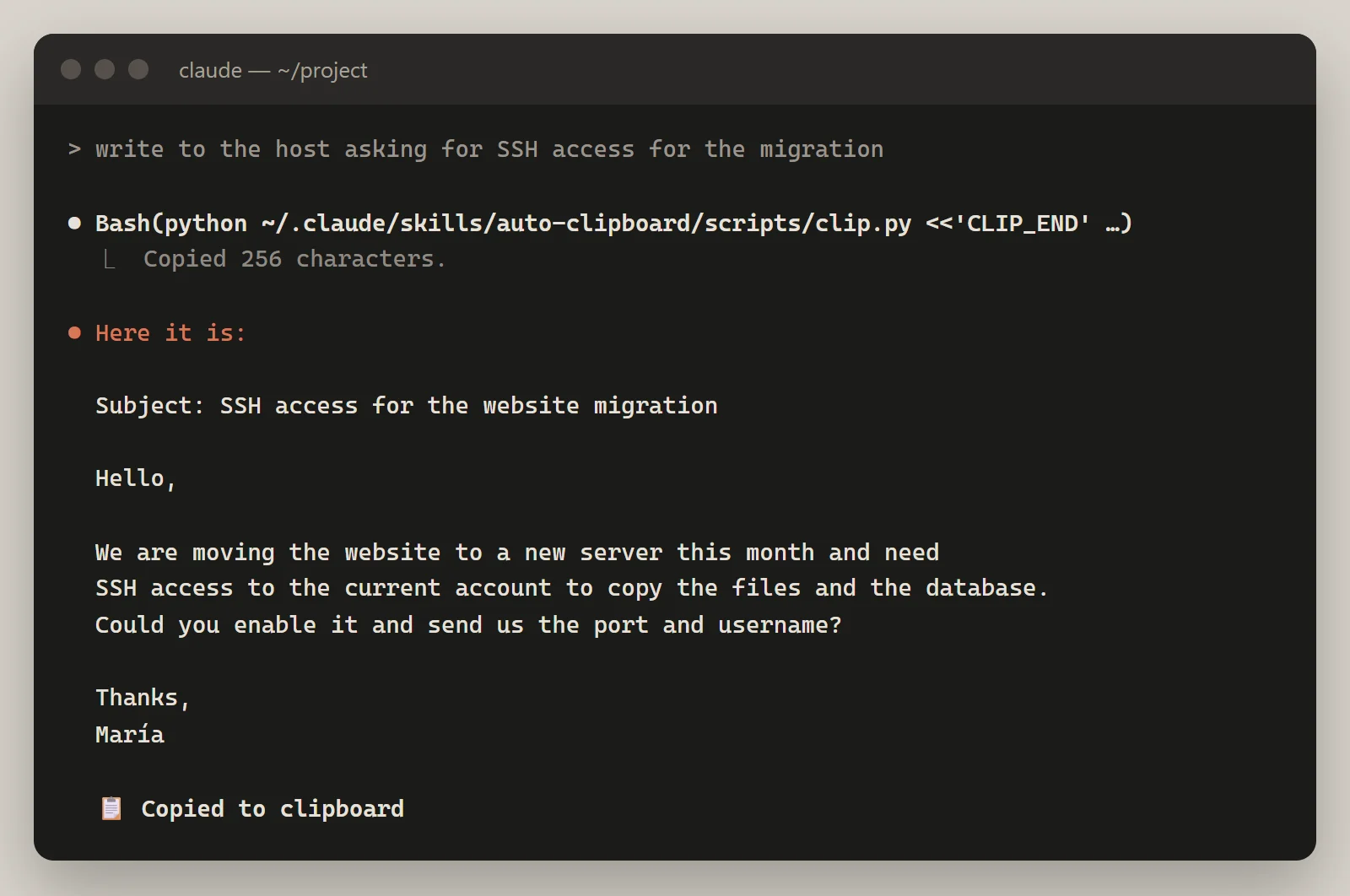
You paste it into your email with its paragraphs exactly as they are, and the "María" in the sign-off stays intact.
3. A password. You ask for one for the database user. Claude generates it on your machine and only tells you it is on the clipboard:
How to install Auto Clipboard
In Claude Code, as a plugin. Type these two commands:
/plugin marketplace add agenciaRSE/auto-clipboard
/plugin install auto-clipboard@auto-clipboard
In Claude Code, by hand. Copy the skills/auto-clipboard folder from the GitHub repository into ~/.claude/skills/.
To have it used on every reply, add this line to your ~/.claude/CLAUDE.md:
Whenever you give me something to paste elsewhere, use the auto-clipboard skill to copy it.In Claude Desktop. Download auto-clipboard.zip from the latest release on GitHub and upload it in Settings → Capabilities → Skills.
On Windows, Python 3 is recommended; without it, Claude copies with PowerShell. To check it works, run python skills/auto-clipboard/scripts/test_clip.py: it tests the password generator and, on Windows, copies and reads back a text with accents and emoji. Full details are on the Auto Clipboard page.
Limits worth knowing
- Claude Desktop and claude.ai chats. There, skills run in a cloud sandbox with no access to your clipboard. The skill does not claim it copied anything: it puts each paste-ready piece alone in its own code block, so the copy button gives you exactly that text, and for passwords it gives you the command to generate them on your machine. In Claude Desktop's Code tab, Claude Code runs on your machine and the skill works in full.
- WSL. It copies through
clip.exe, which cannot exclude anything from history. Passwords copied from WSL do show up in Win+V. - Windows without Python. The password is generated and copied with PowerShell without being shown, but it is not kept out of Win+V history. Claude tells you so.
- Linux. You need Python 3 and
wl-clipboard,xcliporxselinstalled. If none is there, the skill tells you it could not copy and leaves the text in its own code block. - It does not copy what it should not. Examples, logs and code Claude has already written to files are left out on purpose.
If you tell Claude the same thing every day
Auto Clipboard is free and open source (MIT licence): you can read the SKILL.md and the script before installing it, which is what we recommend for any skill. It grew out of a small annoyance that came up every day, which is where the skills people actually use tend to come from.
If your team explains the same rules to Claude in every conversation, or there is a step the model should not improvise, a custom skill solves it. See what we do with Claude skills or, if you want Claude to work directly on your website, Claude with WordPress.